LCBMS
LCBMS
- The Integrator is a custom device that RAB programs for each customer
- Custom programming ensures proper integration with all BACnet applications
Technical Specifications
Lightcloud
Integrator
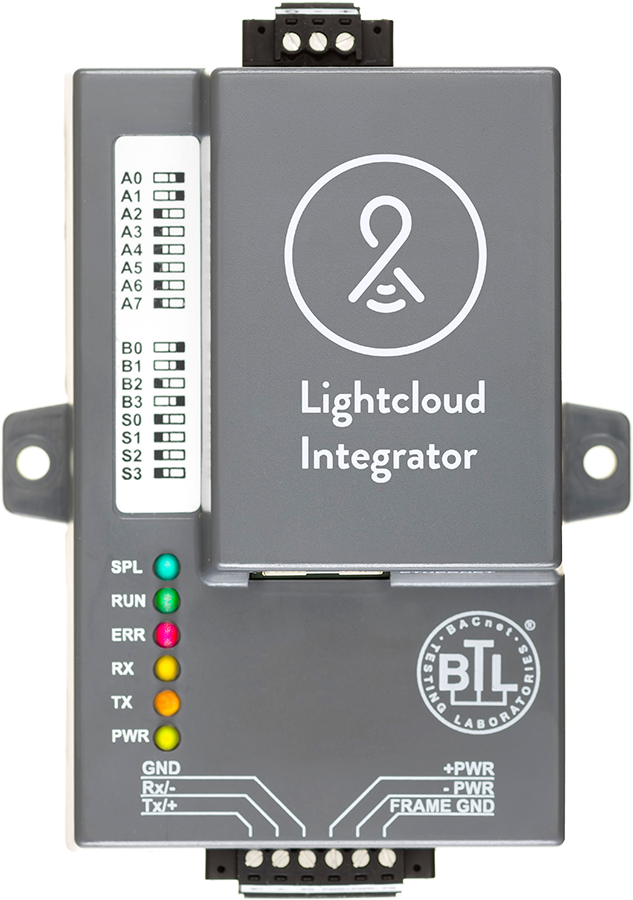
The Integrator is a BACnet compliant device and provides the required protocol to communicate with the BACnet workstation. The Integrator communicates with the Lightcloud Gateway to allow Lightcloud to interact with building management systems.
The BACnet workstation is capable of displaying the status of, or setting the state of, all BACnet compliant devices connected to the network. Communication between the Lightcloud Gateway and the BACnet workstation is through the Integrator. The Integrator maintains internal memory regions for the Lightcloud Gateway to write individual device status and regions where commands initiated from the BACnet workstation are held for the Lightcloud Gateway. The memory area used for status, commands, device names or device grouping is defined in a configuration file. The configuration file is formatted as a CSV (Comma Separated Value) file. This file is unique to every installation and changes when a device is added or removed.
The BACnet workstation is capable of displaying the status of, or setting the state of, all BACnet compliant devices connected to the network. Communication between the Lightcloud Gateway and the BACnet workstation is through the Integrator. The Integrator maintains internal memory regions for the Lightcloud Gateway to write individual device status and regions where commands initiated from the BACnet workstation are held for the Lightcloud Gateway. The memory area used for status, commands, device names or device grouping is defined in a configuration file. The configuration file is formatted as a CSV (Comma Separated Value) file. This file is unique to every installation and changes when a device is added or removed.
Approvals
BACnet Testing Labs (BTL)
B-ASC Ver. 12
LonMark 3.4 Certified
ProtoNode Series
TUV Approved
UL 916 EN 60950-1
EN 50491-3 and CSA C22-2 standards
EN 50491-3 and CSA C22-2 standards
DNP 3.0 Conformance Tested
CE & FCC Approved
Compliance
RoHS Compliant
Mercury and UV free. RoHS-compliant components.
Electrical
Installation
All Lightcloud components should be installed by a licensed electrician in accordance with local codes.
Power
9-30 VDC or 12-24 VAC
(RS-422 = 15-30 VDC or 12-24 VAC)
(RS-422 = 15-30 VDC or 12-24 VAC)
Electrical Ratings
FPC-N34 @ 12V = 240 mA
FPC-N35 @ 12V = 250 mA
FPC-N35 @ 12V = 250 mA
M-Bus
Slave: 500 mA @12V
Master (1 Slave): 580 mA @ 12V
Master (64 Slave): 980 mA @ 12V
Master (1 Slave): 580 mA @ 12V
Master (64 Slave): 980 mA @ 12V
Serial Port Isolation
1500v galvanic isolation
Construction
Temperature
-40°F - 167°F (-40°C - 75°C)
Humidity
50-90% RH, non-condensing
Size
3.2" x 4.5" x 1.6" (W x H x D body)
Other
Warranty
10 Year full hardware warranty with 100% repair or replacement coverage for all properly installed devices. See Lightcloud Warranty Terms.
BACnet Support
BACnet Support
Alarm & Event notification read properties multiples BACnet COV's, Trend Logging, BBMD and optional BACnet Router support. Support up to 10,000 BACnet Objects DIP switches are for setting MAC Address, Node-ID, Baud Rate on the RS-485 Field protocol. One Integrator is required for each Lightcloud Gateway to be used with BACnet.