Technical Specifications
Lightcloud
Gateway Required
No
Communication Protocol
Bluetooth
Range
Indoor: Up to 60 feet between standard building materials. Building materials such as brick, concrete, and steel construction may require additional Lightcloud Blue devices to extend around an obstruction; Up to 200 feet clear line of sight.
Outdoor: Up to 60 feet clear line of sight; Up to 18 feet around corners.
Outdoor: Up to 60 feet clear line of sight; Up to 18 feet around corners.
Spacing Criteria
Lightcloud Blue devices should be placed within the specified range to communicate within the network. Building materials such as brick, concrete, and steel construction or heavy vegetation, bushes or trees may require additional Lightcloud Blue devices to extend around an obstruction.
Factory Reset
Method 1: Delete from App
Open the app and access the device settings for the paired device. Be sure that the device is online and select 'Delete'. The device will flash on/off 3x and return to full brightness.
Method 2: Manual
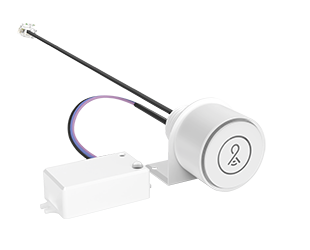
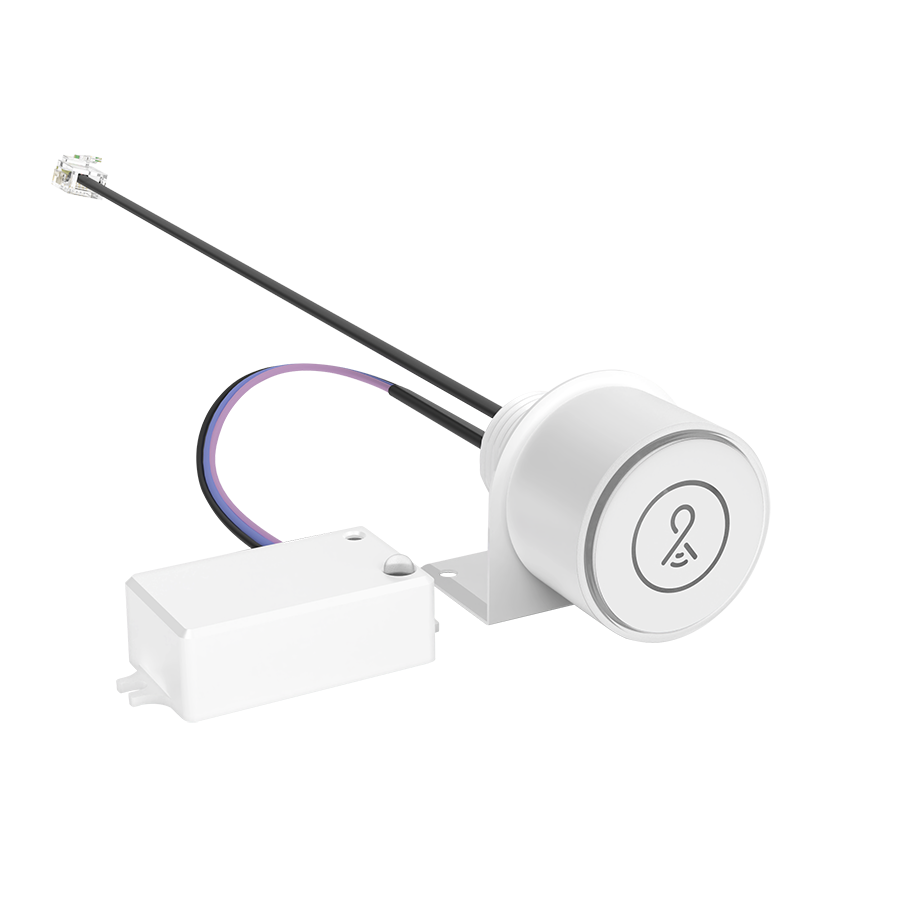
Locate the device identification button at the top of the Controller under the Lightcloud logo. Press and hold this button for 10s or until the indicator light begins flashing red. If the Controller is attached to a fixture, the fixture will also flash on/off 3x.
Open the app and access the device settings for the paired device. Be sure that the device is online and select 'Delete'. The device will flash on/off 3x and return to full brightness.
Method 2: Manual
Locate the device identification button at the top of the Controller under the Lightcloud logo. Press and hold this button for 10s or until the indicator light begins flashing red. If the Controller is attached to a fixture, the fixture will also flash on/off 3x.
Status Indicator
The status indicator light is located around the circumference of the top of the Controller.
Solid Green: connected to a Lightcloud Blue network
Blinking Red: unprovisioned, ready to pair
Solid Green: connected to a Lightcloud Blue network
Blinking Red: unprovisioned, ready to pair
Device Identification Button
Located at the top of the controller under the Lightcloud logo.
Once the Controller has been provisioned to the Lightcloud Blue mobile app this button offers the following functionality:
Press once to rapid identify this device in the Lightcloud Blue mobile app
Press twice to toggle circuit on and off
Press twice and hold to set dim level
Press and hold for 10s to reset the device to factory settings and into pairing mode
Once the Controller has been provisioned to the Lightcloud Blue mobile app this button offers the following functionality:
Press once to rapid identify this device in the Lightcloud Blue mobile app
Press twice to toggle circuit on and off
Press twice and hold to set dim level
Press and hold for 10s to reset the device to factory settings and into pairing mode
Sensor Technology
Microwave (MVS)
Performance
Product Type
Lightcloud Blue Controller
Electrical
Dimmable
Yes using the Lightcloud Blue mobile app or compatible devices. The Low-Voltage Controller must be connected to a compatible 0-10V dim-to-off fixture with 12V AUX supply.
This will not operate properly when connected to a standard dimmer or dimming control.
This will not operate properly when connected to a standard dimmer or dimming control.
Input Voltage
10.5-36VDC
Operating Frequency
50/60Hz
Operating Temperature
-20°C to 45°C (-4°F to 113°F)
Sensor Settings
Sensor Connection Type
Intergrated
Max Mounting Height
8 ft to 12 ft
Detection Range
20 ft diameter at 9 ft mounting height
Default Setting
Uncommissioned State:
Motion Sensitivity: High
Brightness when triggered : 100%
Hold time: 20 minutes
Standby to dim: 20%
Standby time: 1 minute
When vacant: Off
Daylight: Disabled
Photocell: Disabled
Commissioned State:
Once pair, the sensor will default to disabled. Once enabled the following settings apply:
Motion Sensitivity: High
Brightness when triggered: Last on status
Hold time: 20 minutes
Standby to dim: 20%
Standby time: 1 minute
When vacant: Off
Daylight: Disabled
Photocell: Disabled
Motion Sensitivity: High
Brightness when triggered : 100%
Hold time: 20 minutes
Standby to dim: 20%
Standby time: 1 minute
When vacant: Off
Daylight: Disabled
Photocell: Disabled
Commissioned State:
Once pair, the sensor will default to disabled. Once enabled the following settings apply:
Motion Sensitivity: High
Brightness when triggered: Last on status
Hold time: 20 minutes
Standby to dim: 20%
Standby time: 1 minute
When vacant: Off
Daylight: Disabled
Photocell: Disabled
Adjustable Sensor Settings?
Yes, using the Lightcloud Blue mobile app
Sensing Type
Occupancy, Vacancy
Occupied Actions
On or On at a Dim Level
Vacant Actions
Off or On at a Dim Level
Occupancy Timeout
1 minute to 240 minutes
Daylight Sensing
Dim levels will continuously adjust based on the daylight threshold level set in the Lightcloud Blue mobile app.
Construction
Enclosure Material
Plastic
Compliance
Listings
UL Listed
Environment
Suitable for use indoors and outdoors in dry, damp, or wet environments.
IP Rating
IP66
FCC
Complies with Part 15 of the FCC Rules
Other
Compatible Products
RLB Retrofit Light Bar
5-Year, No-Compromise Warranty
RAB warrants that our LED products will be free from defects in materials and workmanship for a period of five (5) years from the date of delivery to the end user, including coverage of light output, color stability, driver performance and fixture finish. RAB's warranty is subject to all terms and conditions found at rablighting.com/warranty.